
How Milox Works: From Signup to Your First Chat
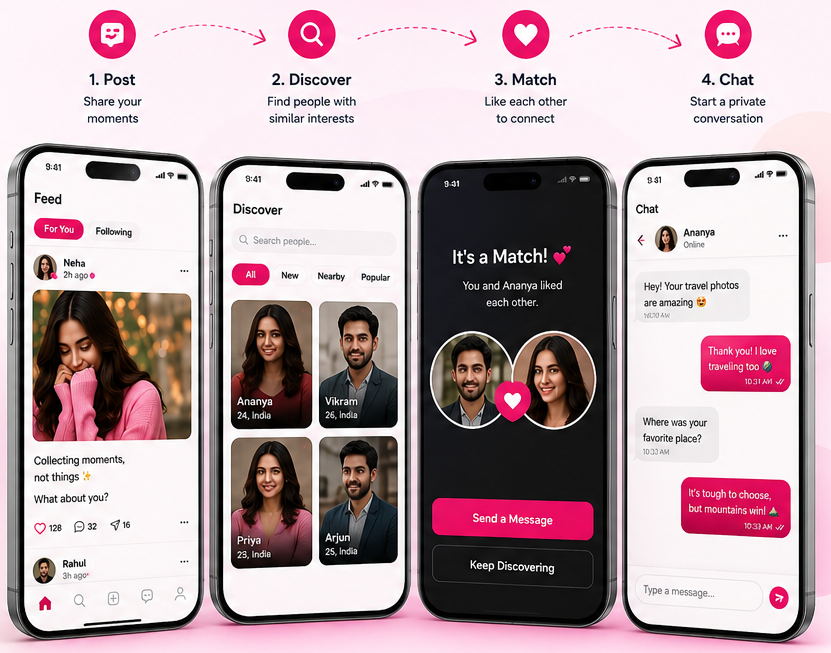
Milox takes you from email signup to mutual-interest chat without a phone number. Here is the path most people follow in their first week.
No phone number. No random DMs.
Just real connections.
500 pts welcome bonus when you join — free to start, no phone required.
Post
Discover
Match
Chat
Mutual match
Chat just unlocked
New interest
They liked your post
Private by default
Email signup · no OTP
Written by the Milox editorial team
Reviewed for accuracy against the live product. Published by Golax India Private Limited. See our editorial standards for how guides are researched and updated.
Updated 2026-09-28
Milox at a glance
| Fact | Detail |
|---|---|
| What it is | A free, privacy-first social dating app for adults 18+ |
| Signup | Email address only. No phone number, no OTP |
| Cost to join | Free. Milox Points welcome bonus of 500 on joining |
| How you meet | Social feed, stories, Reels on Android, hashtags, Discover and mutual-interest chat |
| Where | Web (milox.in) and Google Play. Video calls on Android |
| Operator | Golax India Private Limited |
| Updated | 2026-09-28 |
People often ask how does Milox work compared with swipe apps. The short answer: join with email, show personality on a social feed, then chat only when interest is mutual.
Step 1 — Join with your email
Open Milox on the web or install the app from Google Play. Enter your email and create a password. Confirm you are 18 or older. See the age policy.
Step 2 — Build your profile
Choose a display name. You do not need your full legal name. Add photos and a short bio. Share only what you are comfortable with. Tips: how to write a dating profile.
Step 3 — Post and discover
Share thoughts, photos or stories. Browse Discover and show interest in people who feel right. Hashtags help others find your posts. Short videos, called Reels, are posted in the Android app and stay until you delete them.
Step 4 — Chat after mutual interest
When both people show interest, a private chat opens. Stay on-platform early, use block/report if needed, and prefer a short video call on Android before meeting. See the Safety Centre.
| Stage | What you share | What stays private |
|---|---|---|
| Signup | Email for account access | Phone number (not required) |
| Profile | Display name, bio, photos you add | Surname, address, workplace unless you add them |
| After mutual interest | Private messages with your match | Number and offline details until you choose |
Frequently asked questions
How long does signup take?+
Most people can create an account and open Discover in a few minutes. Take longer on photos and bio if you want a stronger first impression.
Do I have to post to get matches?+
No. You can browse Discover without posting, though a few posts help people get to know you and start better conversations.
When does chat open?+
Private chat opens only after mutual interest — both people must show interest first.
Is Milox free to start?+
Yes. Joining is free and new members get a 500 Milox Points welcome bonus.
Can I use Milox on a computer?+
Yes. Use the web at milox.in. Android users can also install the Google Play app.
Questions or corrections? miloxapp@gmail.com · About Milox · Contact
Keep reading
Related guides
- Online meetup app
- Meet new people online
- Dating app
- Dating sites
- Free dating apps
- Anonymous dating
- Dating without phone number
- Safe free dating
Browse all guides on the homepage index or the sitemap.

Now live on Google Play
Ready to meet someone?
Join free in minutes. Email only — no phone OTP. Chat opens when the interest is mutual.